
Learn how to use Texas business entity search tools, check company status, verify names, and reserve a business name with this step-by-step guide.
Looking up a Texas business is often the first step before making an important decision. Maybe you're planning to work with a company, checking that your own business is still in good standing, or seeing whether your preferred business name is available. Whatever your reason, using the right search tool can make the process much easier.
Texas is a little different from many other states because it offers two official business search systems, each designed for a different purpose. Knowing which one to use helps you find the information you need faster and avoid unnecessary confusion. In this guide, we'll explain how both tools work, what the results mean, and how to move from searching a business name to registering one of your own.
Key Takeaways
Texas runs two separate search tools. The Secretary of State's SOSDirect gives you official filing records for a $1 fee per search[1], while the Comptroller's Taxable Entity Search is free and shows franchise tax and good standing status[2].
Texas is not free to search officially. Unlike most states, SOSDirect charges a statutorily authorized $1 per search, though the fee is waived if you place an order or filing on the results.
Name reservations last 120 days, far longer than most states, and reservations are generic, meaning one reservation can be used to form any type of entity.
DBA filing location depends on your entity type. Corporations, LLCs, and other filing entities register an assumed name with the Secretary of State. Whereas sole proprietorships and general partnerships file at the county level instead.
What Is the Texas Business Entity Search
Texas splits business lookups across two separate state systems, run by two separate agencies, and each answers a different question. Most other states offer one free, unified search. Texas does not, which is the single biggest thing to understand before you start.
SOSDirect is run by the Secretary of State. This is the official record of formation filings, entity names, registered agents, and filing history[1]. It requires a client account and charges a per-search fee. Use it when you need authoritative filing details or plan to file something yourself.
Comptroller Taxable Entity Search is run by the Texas Comptroller of Public Accounts. This free tool shows an entity's franchise tax account status, meaning whether it currently has the right to transact business in Texas[2]. Use it for a quick, no-cost check of whether a company is in good standing.
Why Texas Charges $1 Per SOSDirect Search
The Secretary of State's own site states plainly that there is a "$1.00 statutorily authorized fee associated with each search, which supports the ongoing operations and enhancements of SOSDirect"[1]. You need a funded SOS Client Account to search at all.
One exception: The fee is not charged separately when you go on to place an order or filing based on the search results[4].
How to Search a Business Using SOSDirect
Step 1. Create and Fund an SOS Client Account
Go to SOSDirect[1] and create a client account. You will receive a USER ID by email, then need to fund the account before you can run a search, since Texas bills per search rather than offering free lookups.
Step 2. Choose Your Search Type
Once logged in, you can search by entity name, the Secretary of State file number, an 11-digit Comptroller taxpayer number, or a 9-digit federal EIN.
Step 3. Review Your Results and Pay the Fee
Results show the entity's legal name, file number, status, registered agent, and filing history. The $1 fee applies per search, unless you proceed to place an order or file directly from the results, in which case the search fee is absorbed into that transaction.
How to Search a Business Using the Comptroller's Free Taxable Entity Search
Step 1. Go to the Comptroller's Search Tool
Open the Franchise Tax Account Status Search[2]. No account or login is required, and there is no fee.
Step 2. Search by Tax ID, Entity Name, or File Number
Enter the 11-digit Comptroller taxpayer number, the 9-digit federal EIN, the entity's name, or the file number assigned by the Texas Secretary of State.
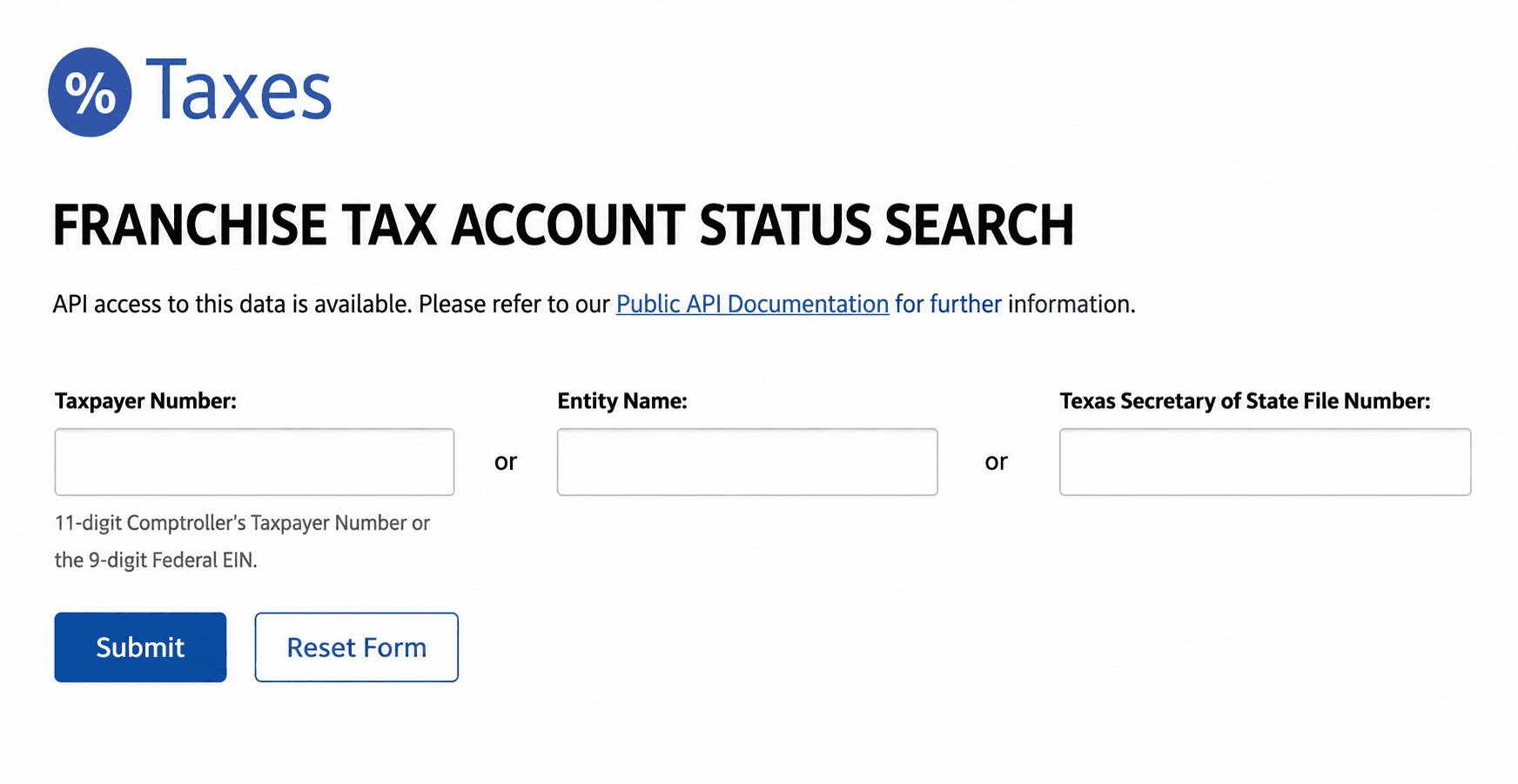
Step 3. Review the Franchise Tax Account Status
Select the matching entity to see its right to transact business in Texas, its SOS registration status, its Secretary of State file number, and its registered agent. This will not show detailed filing history the way SOSDirect does.
How to Read Your Search Results
What Information Is Available
- Legal entity name and Secretary of State file number
- Entity type and current status
- Registered agent name and Texas address
- Franchise tax account status, meaning right to transact business (Comptroller search)
- Filing history, viewable through SOSDirect for the per-page or per-copy fee
What Information Is Not Available
- A federal Employer Identification Number (see the next section)
- Beneficial owners or the full ownership structure
- Financial information such as revenue or assets
- Individual officer or director names, except where included in a Public Information Report filing
What Does Entity Status Mean
Texas entities effectively carry two related but distinct statuses, and it helps to know both exist[5]:
Status Source | Label You Might See | What It Means |
Comptroller | In Good Standing | Franchise tax filings and payments are current |
Comptroller | Not in Good Standing / Franchise Tax Ended | Franchise tax filing or payment is overdue |
Secretary of State | In Existence / Active | Registered and has not been terminated or forfeited |
Secretary of State | Forfeited Existence | SOS terminated the entity, usually following a Comptroller tax forfeiture |
Secretary of State | Voluntarily Terminated | Owners closed the entity themselves |
The Comptroller and the Secretary of State are two different agencies with two different systems, so a status change at one does not appear at the other instantly. If a search on one tool looks off, the free Comptroller search is the fastest way to double-check right-to-transact status before assuming a filing problem.
Checking Name Availability and Reserving Your Name in Texas
Because a preliminary phone or email check is not official, a name reservation is the more reliable way to hold a name while you get your formation paperwork together.
If you have not settled on a name yet, Swyft Filings' free business name generator is a useful starting point before you reserve anything with the state.
How to Reserve a Business Name Online
- File a name reservation through SOSDirect[1], available 24 hours a day, 7 days a week.
- Pay the $40 filing fee for Form 501.
Reservations are generic, meaning a name reserved while planning to form a corporation can still be used to form an LLC instead, or any other entity type.
What a Reservation Does and Does Not Protect
A reservation holds the name for 120 days. You can renew by filing a new application during the 30 days before the current reservation expires, and there is no limit on how many times you can reserve the same name.
A reservation does not, by itself, constitute your business. You still need to file a Certificate of Formation before the reservation expires; see our full walkthrough of forming an LLC in Texas if that is the entity type you are filing, including when to draft an LLC operating agreement.
When To Consider a DBA (Assumed Name) in Texas
Texas splits assumed name, or DBA, filings between two levels of government depending on the type of business filing it, which is more nuanced than most states.
- File with the Secretary of State if you are a corporation, LLC, limited partnership, professional association, limited liability partnership, or foreign filing entity[3].
- File with the county clerk if you are a sole proprietorship, general partnership or joint venture, estate, real estate investment trust, or any other business type not listed above[3]. File in every county where you maintain a business office, or every county where you conduct business if you have no Texas office.
Entities that file an assumed name certificate with the Secretary of State are not also required to file at the county level; that dual requirement was eliminated by state law effective September 1, 2019[3].
The state-level assumed name certificate (Form 503), is valid for up to 10 years, and does not need an original signature or notarization. Note that Texas does not reject an assumed name application just because a similar or identical name is already on file, so more than one business can hold the same DBA at once; it is up to each business to protect its own name and goodwill.
Swyft Filings handles DBA filing at the correct level for your entity type, so you do not have to sort out state versus county requirements yourself.
Texas Business Name Conventions
Naming Rules
- An LLC name must contain "limited liability company," "limited company," or an abbreviation such as LLC, L.L.C., LC, or L.C.
- A corporation name must contain "corporation," "incorporated," "company," or "limited," or an abbreviation such as Corp., Inc., Co., or Ltd.
- A nonprofit corporation is not required to include an entity designator at all, unlike most other Texas entity types; see our guide to starting a nonprofit in Texas for the full naming and filing rules.
- The name cannot imply a purpose the entity is not organized to carry out, or suggest a government affiliation it does not have.
What is the Cost to Search and Reserve a Business Name in Texas
The Comptroller search is free. Everything through the Secretary of State carries a fee, whether that is the search itself, reserving a name, filing a new business, or keeping it compliant.
Item | Cost |
Comptroller Taxable Entity Search | Free |
SOSDirect search | $1 per search (waived if you file or order from the results) |
Name Reservation, 120 days (Form 501) | $40 |
Assumed Name Certificate, Secretary of State (Form 503) | $25 |
Let Us File Your Texas Business
Once your search confirms a name is clear, and you understand the fees involved, filing is the only step left. Swyft Filings handles the LLC, C Corp, and Nonprofit paperwork, state fees, and mailing so you can focus on running the business instead of tracking forms. We also offer registered agent service, DBA filing, and annual report filing. Tell us about the business you want to build, and we will handle the paperwork.
FAQs
Yes. Both SOSDirect and the Comptroller's Taxable Entity Search will return terminated, forfeited, or dissolved entities along with their status, so their filing history remains accessible even after they stop operating.
No. Both SOSDirect and the Comptroller search use the same process regardless of entity type. You search by name, file number, or taxpayer ID either way; the tools do not separate LLCs and corporations into different search paths.
Generally, yes, the $1 fee applies per search. The one exception is when you go on to place an order or file directly from your search results; in that case, the search fee is not charged separately and is effectively folded into that transaction.
The Comptroller's free search is the better tool for this specific question, since it displays the entity's franchise tax account status directly. SOSDirect shows the Secretary of State's own status field, such as in existence or forfeited existence, which usually reflects Comptroller action after some delay.