
Learn how to search South Carolina business records, use the available search options, and understand what the “Good Standing” status really means.
When you search for a South Carolina business, one status label can be misleading: Good Standing.
Many people assume that a business listed as “Good Standing” is active and operating. However, the South Carolina Secretary of State uses this status more narrowly. It only means the entity has not been dissolved according to the Secretary of State’s records.[3]
A company that is inactive, dormant, or no longer conducting business may still appear as Good Standing if it has not been formally dissolved. In other words, this status confirms that the business legally remains on record, but it does not prove the company is currently operating.
This guide explains how to perform a South Carolina business entity search, how to use the available search options, and what information you should review before relying on a business record.
Key Takeaways
The South Carolina Business Entity Search portal is called Business Entities Online. It launched in 2017 and replaced an all-paper process. [2]
Good Standing means ‘not dissolved’; it doesn't clear whether the company is operating.[3]
There are two search modes only. Business name and registered agent. There is no officer search and no entity-number field.
South Carolina LLCs file no annual report with the SOS, and this is why an LLC record rarely changes.
The SOS does not file DBAs. Assumed names go to the county, not the state. [3]
How To Perform a South Carolina Business Entity Search Step-by-Step
Step 1. Open Business Entities Online
Go to the entity search on the Secretary of State's Business Entities Online portal. [1] Free, and no account needed to search.
The portal may add a verification step during a search, and page loads can be slow at busy times. If it stalls, try again outside business hours rather than assuming the record is missing.
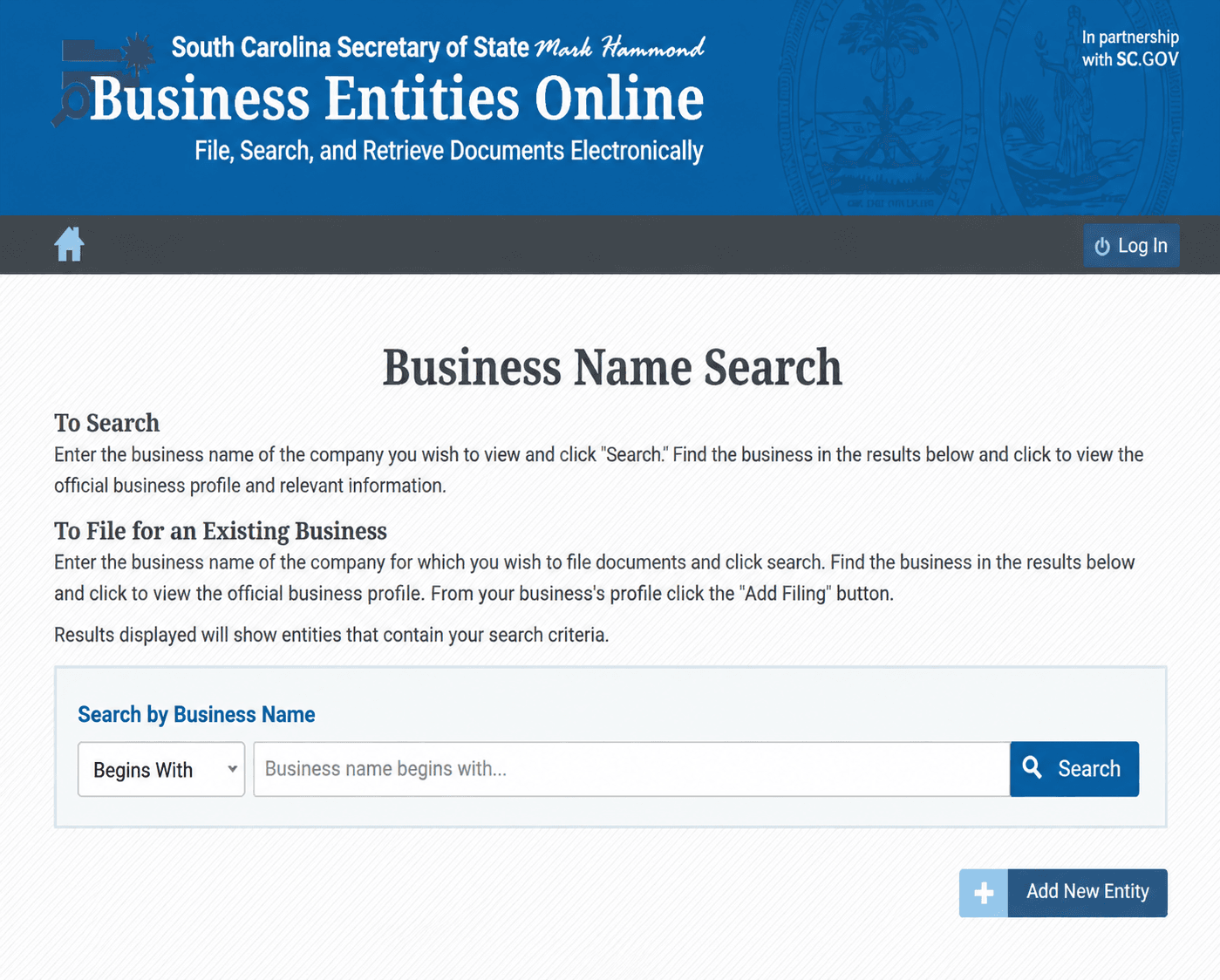
Step 2. Choose Your Match Mode
The name search offers three:
Match Mode | What It Returns | Use It To |
Begins with | Names starting with your term | Find a company when you know how the name opens |
Contains | Names with your term anywhere inside | Clear a name, or find a half-remembered one |
Exact match | Only the precise name you typed | Confirm one specific company |
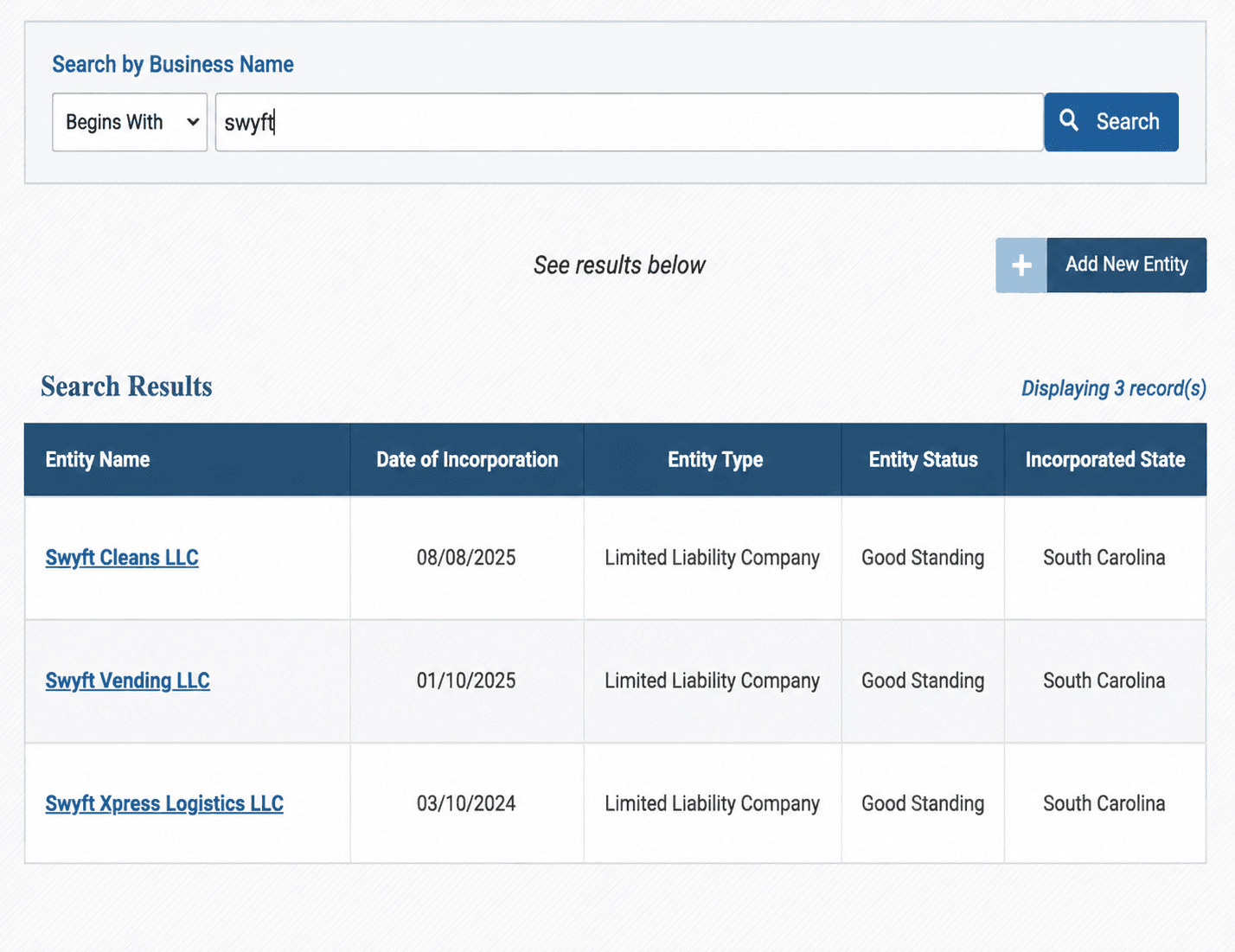
Use Contains when clearing a name. Begins with will miss "The Palmetto Group" if you searched "Palmetto," and exact match will miss everything that is merely close. Drop the designator too. Searching "Palmetto Manufacturing" returns more than "Palmetto Manufacturing LLC" will.
Step 3. Know What You Cannot Search By
Two limits catch people out, and neither is signposted on the portal.
- No officer or director search. Business Entities Online will not let you find companies by the people behind them. To identify officers, you order the entity's filed documents from the Secretary of State.
- No entity number search field. South Carolina assigns every entity an ID, and it appears in your results, but there is no documented field to search by it. You use it to confirm you have the right record, not to find one.
That second point matters when names are similar, which in South Carolina they often are. Note the ID from the results and use it to check you stayed on the same record.
Step 4. Use the Registered Agent Search
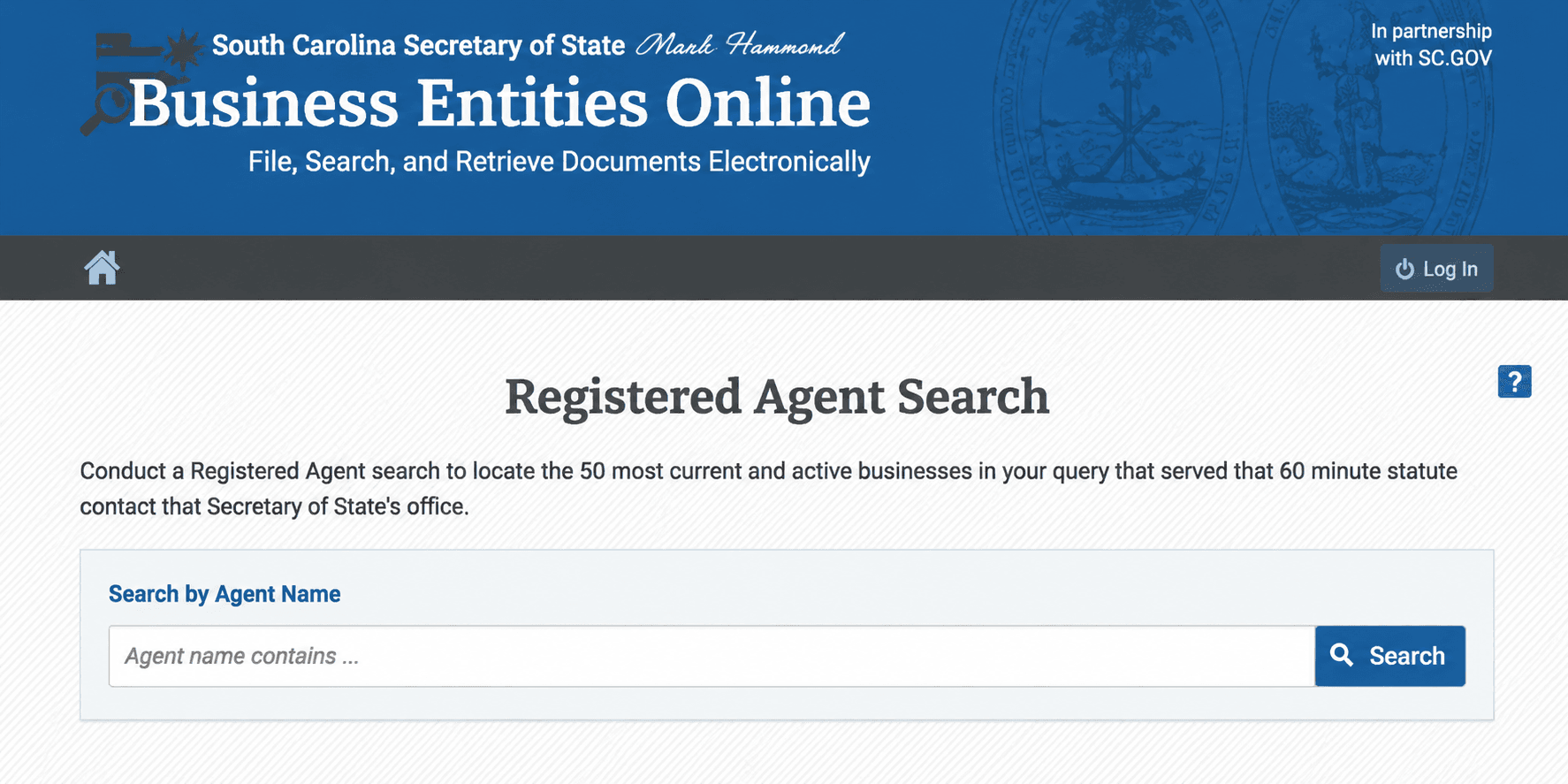
This is the second mode, and it is the more powerful one for due diligence. Enter a full or partial agent name and the portal returns every entity that agent serves. [2] That maps an agent's entire client base, and it surfaces companies that share representation, which is how clusters of related entities become visible.
Step 5. Open the Entity Record
Click through from the results for the full profile: entity name, ID, type, status, formation date, and registered agent details.
How To Read Your South Carolina Business Entity Search Results
Field | What It Tells You | Why It Matters |
Entity name | The exact registered legal name | It should match the name on any contract or invoice |
Entity ID | The state's numeric identifier, labeled simply "ID" | Confirms you are on the right record when names are alike |
Entity type | LLC, corporation, LP, LLP, nonprofit, professional corporation | Sets which rules apply |
Status | Good Standing, or a dissolution label | Read the next section before you interpret this |
Formation or file date | When the Secretary of State filed the entity | Check it against the track record being claimed |
Registered agent | Name and in-state address | Must be a physical South Carolina address, no PO boxes |
The portal uses several numbers that look alike and are not interchangeable. Alongside the entity ID, receipts carry a Filing ID (hyphenated, in the style 170307-1218069), a Transaction ID, and a TPE ID. If someone gives you "the number" for a South Carolina company, check which one they mean before you go looking.
A related warning from the Secretary of State's own scam alert: A "document number" or "Customer ID" printed on a mailed solicitation does not match any number issued to your business by a federal or state agency. [2] If a letter quotes a number you do not recognize, that is the tell.
What "Good Standing" Actually Means in South Carolina
Most states label an active entity Active. South Carolina labels it Good Standing, and the difference is not cosmetic.
The Secretary of State defines it precisely: an entity status of Good Standing means the business entity has not been dissolved upon the records of the Secretary of State. It does not mean the business is currently in operation, only that its legal existence has not been terminated. [3]
Good Standing proves | Good Standing does not prove |
The entity legally exists | That it is trading |
It has not been dissolved or terminated | That it has employees, revenue, or premises |
It can obtain a Certificate of Existence | That it is licensed for its work |
Its registration is on the record | That it is current with the Department of Revenue |
A company that stopped operating five years ago, but never filed to dissolve, still reads Good Standing today. So does a shell formed and abandoned.
If you are running due diligence on a South Carolina company, treat Good Standing as the floor, not the answer. Check the formation date, the registered agent, and the filed documents.
Other Statuses in South Carolina Business Entity Search
Status | What It Means | Applies To |
Dissolved by administrative action | The state ended the entity for non-compliance | Corporations |
Forfeiture | The entity forfeited its standing | LLCs |
Revoked | Authority to transact business was withdrawn | Certificates of authority, foreign entities |
Voluntarily dissolved | The owners wound it down themselves | Any type |
Administrative dissolution is usually reversible. Cure the underlying default and apply to reinstate under S.C. Code Title 33. [4] [5]
Why South Carolina Records Change Less Than Other States'
This is worth knowing before you read a static record as neglect. South Carolina LLCs file no annual report with the Secretary of State. Corporations meet their annual reporting requirements through the Department of Revenue rather than the SOS.
So an LLC record that has not moved in years is not evidence of anything. In a state with annual SOS filings, that gap would be a warning sign, but in South Carolina it is not.
How To Check Business Name Availability in South Carolina
South Carolina requires a new name to be distinguishable from every entity already registered.
- Run an exact match on your full proposed name to rule out a direct collision.
- Run contains on the distinctive word to see the whole field.
- Run begins with on the first significant word.
- Repeat without the designator, since LLC or Inc. does not distinguish a name.
- Try abbreviations and alternative spellings.
- Search the federal trademark register separately.
A clean exact-match result is a green light to proceed, not a guarantee. The Secretary of State decides at filing.
An available entity name is also not trademark clearance. Those are separate questions with separate answers. Still deciding what to call the business? The free Swyft Filings business name generator is a sensible first stop.
What Are the South Carolina Naming Rules
Entity Type | The Name Must Contain |
Limited liability company | "Limited Liability Company," LLC, or an accepted abbreviation |
Corporation | "Corporation," "Incorporated," "Company," or Corp., Inc., Co. |
Limited partnership | "Limited Partnership" or an accepted abbreviation |
Limited liability partnership | "Limited Liability Partnership" or an accepted abbreviation |
What Words Are Restricted in South Carolina Business Names
Your name must indicate that you are a private business, not a government body. [4] Avoid:
- Treasury
- State Department
- Legislative
- National
- Anything else implying a government agency or that reads as ambiguous
Words That Need Proof of Qualification
Terms implying a regulated service require paperwork confirming you can legally provide it. The two most common are bank and attorney, but the principle covers any licensed profession.
A South Carolina entity type worth knowing
The Secretary of State administers statutory close corporations alongside standard corporations, and professional corporations as a distinct category. [3]
One thing not to assume: South Carolina does not list PLLCs as a separate filing category. Professional corporations and LLCs are distinct categories under Title 33, and there is no separate professional LLC bucket. If you were expecting a PLLC option, that is why you cannot find it.
How To Reserve a South Carolina Business Name
You can reserve an available name through Business Entities Online while you prepare your formation paperwork, which blocks other filers from claiming it in the meantime. [1]
Confirm the current reservation fee and term in the portal before you file, since the Secretary of State sets these under the Title 33 fee schedule. [4]
Reserving is optional. If your formation documents are ready, filing them claims the name at the same moment.
When you are ready, you can form your South Carolina LLC, or file as a C Corp or file as a Nonprofit.
Why You Cannot Find South Carolina DBAs in This Search
The South Carolina Secretary of State does not file DBAs at all. [3] There is no state-level assumed name register, so no amount of searching Business Entities Online will surface one.
Assumed names are handled at the county level, through the county clerk or the Clerk of Court in the jurisdiction where you operate. The process, the fees, and the forms differ from one county to the next. This is what it means for your search:
- An empty result proves less here. A South Carolina business trading under a brand name may have that name recorded only in a county courthouse.
- Search the entity name, not the brand. If you have a trading name and no results, you are probably looking at a DBA.
- You must be registered first. To file an assumed name, you need your business registered under its official name.
- Check the right county. Multi-county operations may need to check more than one.
Swyft Filings can handle your South Carolina DBA registration at the county level, and for enforceable brand protection, we can help you with federal trademark registration paperwork.
Check Your Domain and Handles Before You Commit
Clearing Business Entities Online confirms the Secretary of State will accept your name. It says nothing about whether the name works as a brand, and in South Carolina it says nothing about county-level DBAs either.
Run three more checks in the same sitting:
- The domain. Check the exact match and a fallback or two.
- The social handles. Check the platforms you will actually use.
- The federal trademark register. State availability is not trademark clearance.
Keep the shortlist alive until one name clears all four.
How To Verify a South Carolina Company Before You Deal With It
Because Good Standing proves less here than an Active status does elsewhere, the checklist matters more.
- Search the exact legal name from the contract or invoice, not the brand name.
- Save the entity ID, the status, and the date you checked.
- Confirm the status is Good Standing, then keep going, because that only tells you it has not been dissolved.
- Check the formation date against the experience being claimed.
- Read the registered agent and confirm a physical South Carolina address.
- Run a registered agent search on that agent to see how many entities share it.
- Order the filed documents if you need to identify officers, since the search will not.
- Order a Certificate of Existence if the transaction is significant.
Red Flags Worth a Second Look:
- A company using LLC or Inc. in its name with no record on Business Entities Online at all.
- A dissolution, forfeiture, or revoked label behind a business presenting itself as operational.
- A very recent formation date behind a claim of long experience.
- Frequent registered agent or registered office changes, which can signal instability or an entity that is hard to serve.
- A brand name that returns nothing, when the company should be registered under a legal name you have not been given.
Let Us File Your South Carolina Business
Once your search confirms a name is clear across the state register, the county, and the federal register, filing is the next step. Swyft Filings has helped more than 600,000 businesses get started since 2015. We handle South Carolina LLC formation, C Corp and nonprofit filings, registered agent service, DBA registration, and business name changes.
Bibliography
- South Carolina Secretary of State. Business Entities Online, Entity Search. Accessed on August 7, 2026.
- South Carolina Secretary of State. Business Entities Online. Accessed on August 7, 2026.
- South Carolina Secretary of State. FAQs About Business Entities. Accessed on August 7, 2026.
- South Carolina Legislature. Code of Laws, Title 33, Chapter 1. Accessed on August 7, 2026.
- South Carolina Legislature. Code of Laws, Title 33, Chapter 44, Uniform Limited Liability Company Act. Accessed on August 7, 2026.