
Learn how to search Pennsylvania's free business database to look up a company, check name availability, or find a fictitious name.
Many customers or vendors need to look up company information before signing a contract. Sometimes business owners need to see whether their own business is active and in good standing. Also, people looking to start a new business need to know if the name they are finalizing is free to use. If you are looking for any of these things in Pennsylvania, you have come to the right place.
Pennsylvania's Department of State maintains a free public database that answers all three questions. This guide covers the official search tool, what your results actually mean, and how to reserve or register a name once it's confirmed clear.
Key Takeaways
Pennsylvania runs its business search through the Department of State and offers both a free basic search and an advanced filtered search from the same page.
Being registered with the Department of State does not mean a business holds the professional or industry license it needs. Those are verified separately.
Unlike some states, Pennsylvania's own database includes fictitious name (DBA) filings, so you do not need a separate county-level search.
What Is the Pennsylvania Business Entity Search
The Pennsylvania business entity search is the public database maintained by the Department of State's Bureau of Corporations and Charitable Organizations. It covers every corporation, LLC, limited partnership, nonprofit corporation, and fictitious name on file in the state, searchable through the official Business Entity Search portal. [1]
General Search vs. Name Availability Search: Which Do You Need
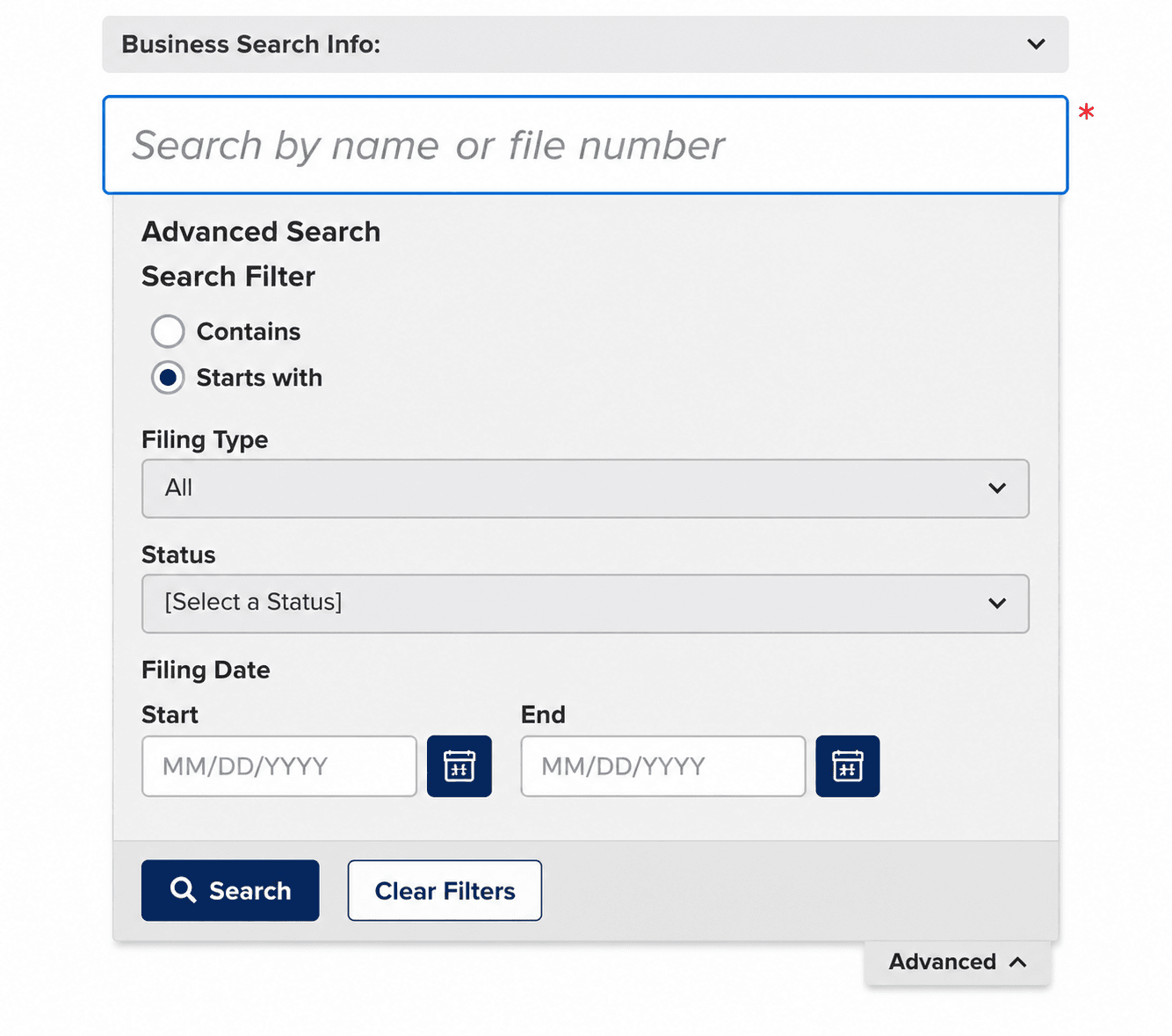
- Looking up an existing company: Use the standard Business Entity Search. Type in a name or entity number and switch to "Advanced" to filter by filing type, status, or filing date.
- Checking if a new name is free: The same search tool doubles as your name availability check. If nothing matches your proposed name closely enough to conflict, it is likely available, though Pennsylvania does not issue a formal instant "available or not available" verdict the way some states do.
How to Search for a Business Entity in Pennsylvania
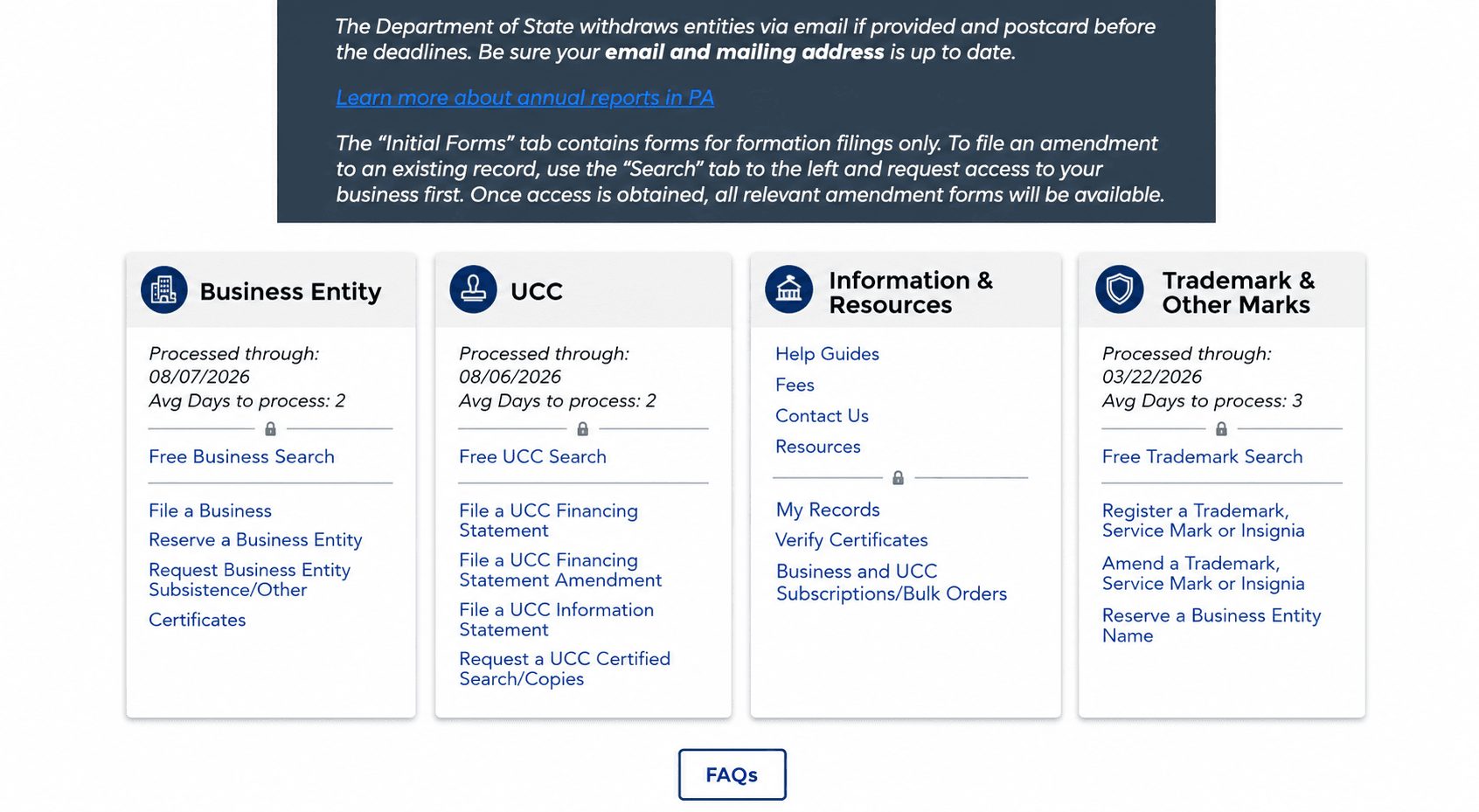
Step 1. Go to the Official Portal
Open the Department of State's official Business Entity Search tool. [1] Avoid third-party sites charging for what the state provides for free.
Step 2. Run a Simple or Advanced Search
Type part or all of the business name into the search box for a quick match. For a tighter search, switch to "Advanced" and filter by search type (contains or starts with), filing type, status, or filing date.
Name search tips:
- If you have the entity number, use it; it is the most precise way to land on the right record.
- When searching by name, try the "contains" option on your single most distinctive word rather than the full name, so you catch close variants and filler-word differences.
- A common pitfall is missing a match because of an added "the," "and," or designator, which the state does not treat as making two names distinguishable.
Step 3. Review Your Results
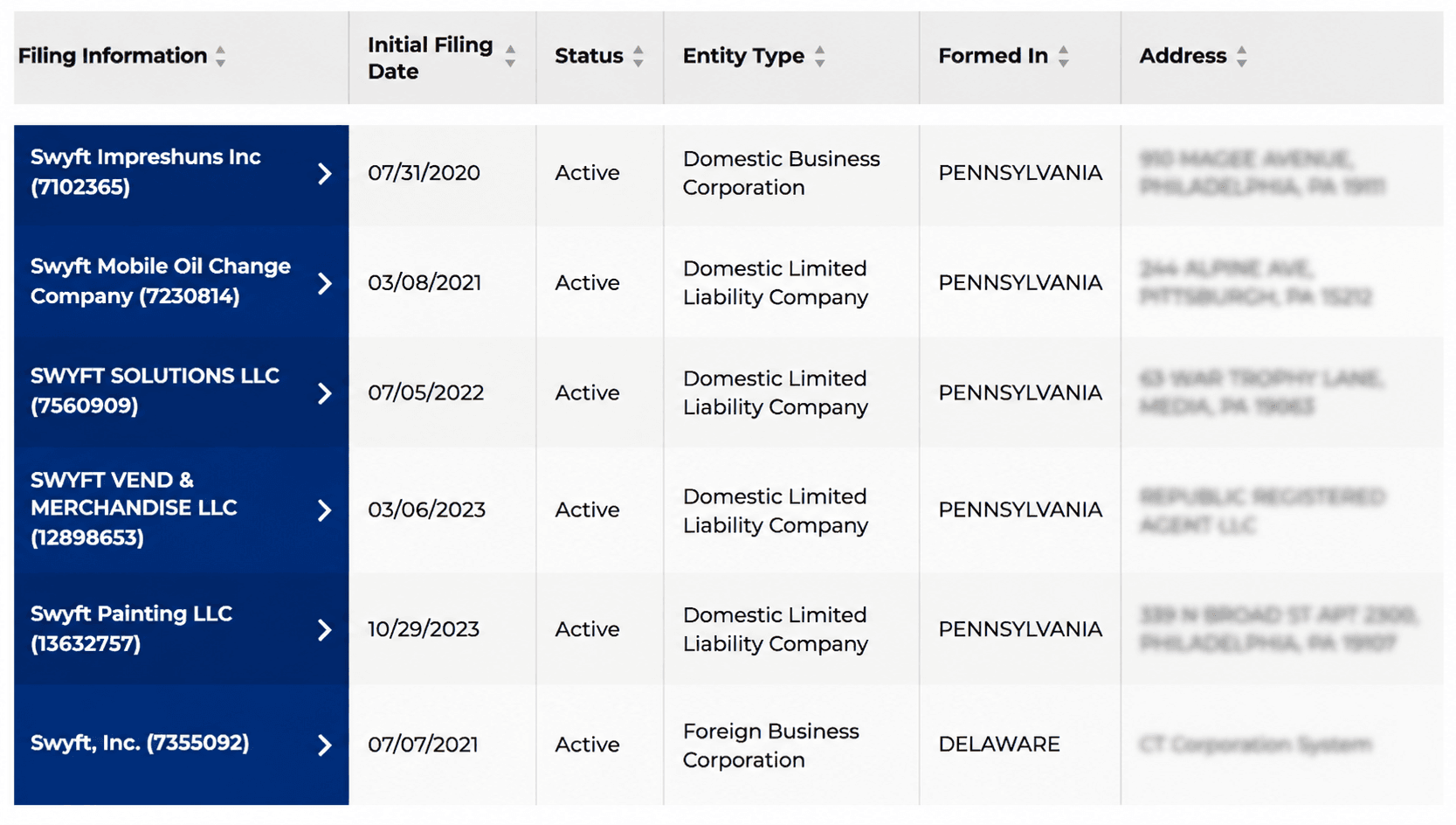
Results display in a table showing filing information, initial filing date, status, entity type, where the entity was formed, and its address.
Step 4. Open the Full Entity Record
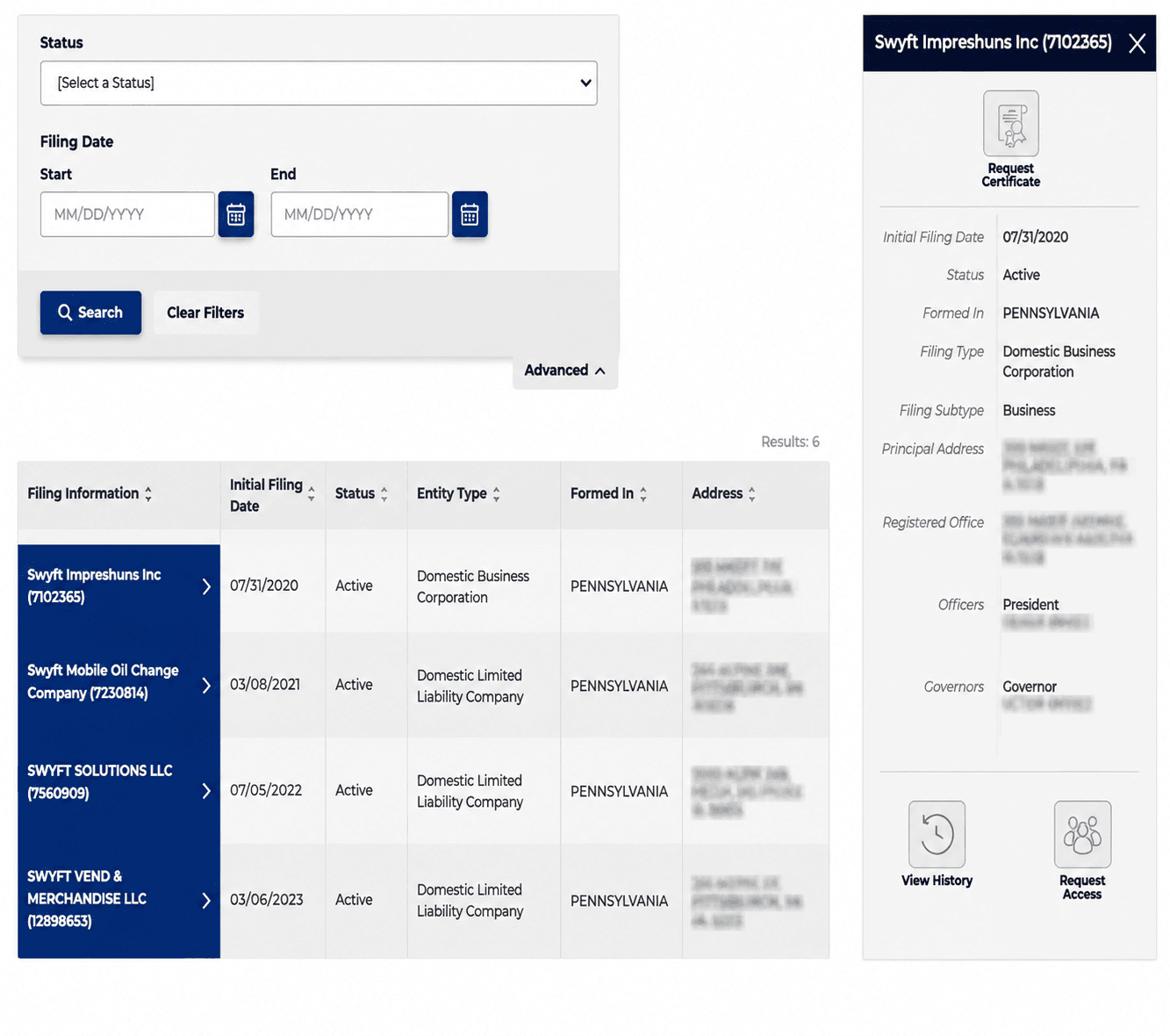
Click a business name to view its complete record, including filing history, principal address, and options to request a certificate.
How to Read Business Entity Search Tool Results
What Information Is Public
- Legal entity name as filed with the Department of State
- Entity number and entity type
- Initial filing date and where the entity was formed
- Current status (see status table below)
- Principal address on file
- Registered office or registered agent information
- Filing history, including amendments and annual reports
What Information Is Not Public
- Personal financial information such as revenue, assets, or bank details
- Ongoing legal or tax history beyond what appears in the filing record
- A federal Employer Identification Number (see the next section)
What Does Entity Status Mean
Status | What It Generally Means |
Active | Entity is current on its filings and in good standing |
Inactive | Entity has not completed a required filing but has not been formally dissolved |
Dissolved | Entity has been formally closed and no longer legally exists |
Revoked | State administratively terminated the entity, often for non-compliance |
Withdrawn | A foreign (out-of-state) entity has ended its registration to do business in PA |
Merged | Entity was absorbed into another entity through a merger |
A name attached to a Dissolved, Revoked, or Withdrawn entity is not automatically available. Confirm current status directly in the search results, and when in doubt, order a Certificate of Subsistence before relying on a name being free.
How to Use the Search to Vet a Business
If you are running the search to check out a company before you deal with it, a few patterns are worth a closer look:
- A status of Inactive, Revoked, or Withdrawn when the business is presenting itself as fully operational.
- A recent formation date on a company that claims a long track record.
- Several unrelated entities sharing the same registered office address, which can be an ordinary registered-agent arrangement or, occasionally, a red flag worth further diligence.
- A missing or overdue annual report.
Checking Name Availability and Reserving Your Name
If you have a name in mind and are not ready to file yet, Pennsylvania lets you hold that name for 120 days through a formal reservation. This step is optional. Most people forming a business skip it and go straight to filing, since the reservation adds a fee and a few extra days without adding any protection once you're ready to file anyway.
A reservation makes sense if you still need time to line up a registered agent, finish an operating agreement, or wait on funding before you file, and you want to make sure no one else takes the name in the meantime.
How to Reserve a Business Name in Pennsylvania
Step 1. Confirm the Name Is Actually Clear
Run it through the Business Entity Search first. If nothing conflicts closely enough, the name is likely available to reserve. Skipping this step is the most common reason a reservation gets rejected.
Step 2. Complete the Name Reservation Form
Fill out the Name Reservation Form. You'll need the exact name as you want it to appear, including the entity designator (like "LLC" or "Inc.") you plan to use once you file. [2]
Step 3. Pay the Filing Fee
The fee is $70, payable by check or money order made out to the Department of State.
Step 4. Mail the Form
File online through the Department of State's Business Filing Services portal for faster processing, or mail the form to:
Bureau of Corporations and Charitable Organizations,
P.O. Box 8722, Harrisburg,
PA 17105-8722.
Pennsylvania Business Name Conventions
Before you search or reserve a name, it helps to know what Pennsylvania actually allows. A name can show up as available in the search tool and still get rejected at filing if it breaks one of the state's naming rules.
Naming Rules for a Pennsylvania Corporation or LLC
- Must be written in Roman letters, though the name itself can be in any language.
- Must end with an accurate entity designator. An LLC must include "limited liability company" or an abbreviation like "LLC" or "L.L.C." A corporation uses a term such as "incorporated," "company," or "corporation," or its abbreviation.
- Must be distinguishable from other names already on file with the Department of State. [5]
Restricted and Prohibited Words
- Cannot imply the business is a government agency, such as the FBI or Treasury.
- Cannot imply banking, trust, insurance, or public utility affiliation (words like "bank," "trust," "insurance," or "electric").
- Cannot use words implying an educational institution ("college," "university," "seminary") or a licensed profession ("engineer," "architect," "surveyor") without the applicable license or permit.
- Cannot include profane or blasphemous language.
Fictitious Name (DBA) Search in Pennsylvania
A fictitious name, Pennsylvania's term for a DBA, lets a business operate under a name other than its legal entity name. Unlike some states, Pennsylvania fictitious names are filed with the state, not the county, so they show up in the same search tool as entity filings. [3]
How to Search Existing Fictitious Names
Use the same Business Entity Search and switch the filing type filter to fictitious names, or search the name directly.
A Pennsylvania fictitious name has no expiration date once approved and stays in effect until formally withdrawn. Note that you cannot simply drop "LLC" or "Inc." from a registered entity name and refile it as a fictitious name; the state treats that as misleading. [4]
What is the Cost to Search and Reserve a Business Name in Pennsylvania
The search itself is free. These are the costs that come up once you act on what you find, whether that is reserving a name, registering a fictitious name, filing a new business, or ordering proof of a company's standing.
Item | Cost |
Business Entity Search (online) | Free |
Written filing-history printout (by mail) | $15 per entity |
Name Reservation (120 days) | $70 |
Certificate of Subsistence / Good Standing | Approximately $40 |
Certified Copy of a Filing | Fee varies, ordered directly from the Department of State |
Let Us File Your Pennsylvania Business
Once your search confirms a name is clear, and you understand the fees involved, filing is the only step left. Swyft Filings handles the LLC, C Corp, and nonprofit paperwork, state fees, and mailing so you can focus on running the business instead of tracking forms. We also offer registered agent service, fictitious name filing, and annual report filing services so nothing slips once you are up and running.
Bibliography
- PA Department of State. Business Entity Search. Accessed July 27, 2026.
- PA Department of State. Name Reservation / Transfer of Reservation (DSCB:15-208). Accessed July 27, 2026.
- PA Department of State. Registration of Fictitious Name (DSCB:54-311). Accessed July 27, 2026.
- PA Business One-Stop Shop. Fictitious Name. Accessed July 27, 2026.