
Learn how to run a free Tennessee Secretary of State business search, check name availability the right way, and read what a status actually means before you file.
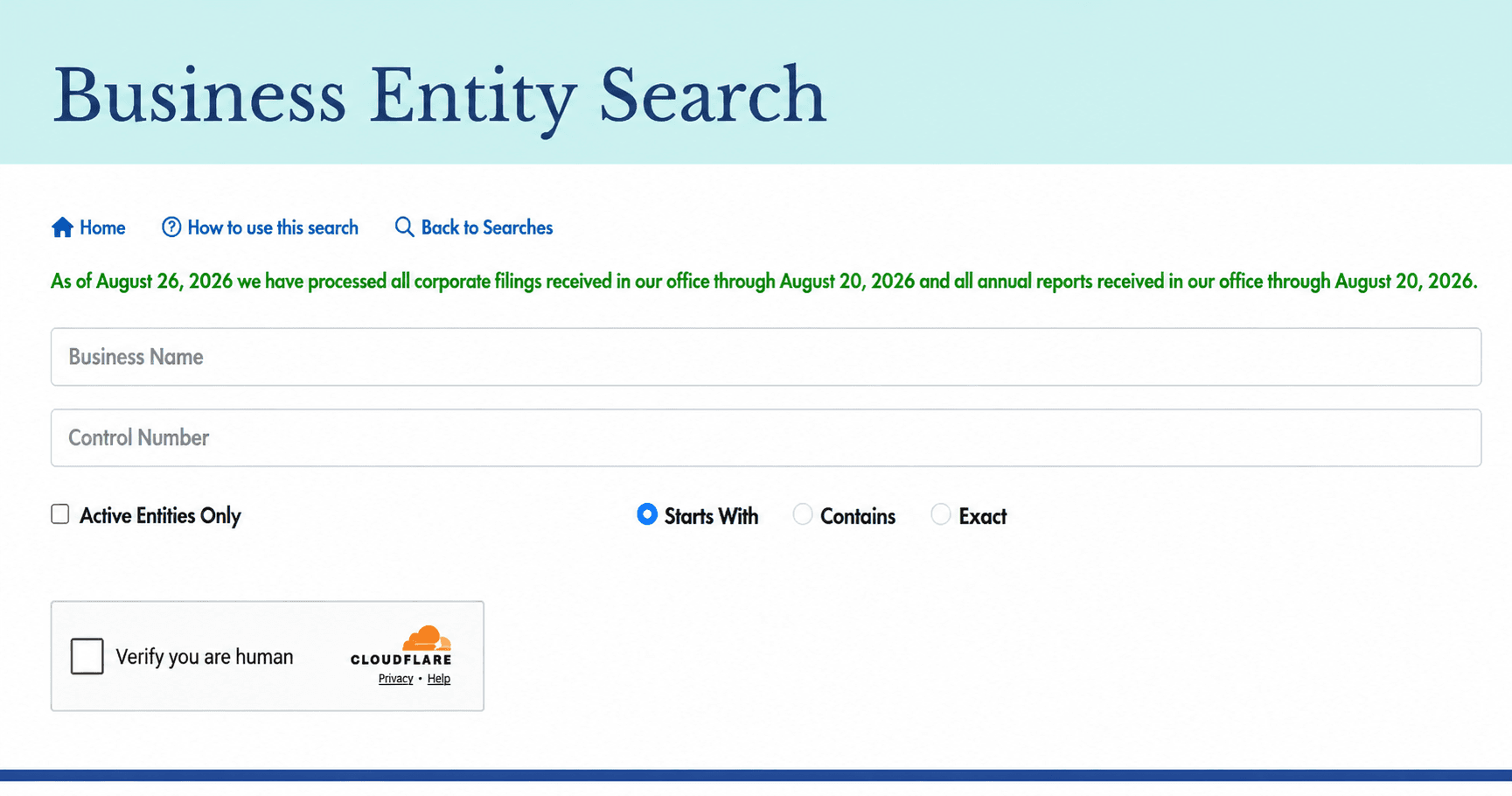
The Tennessee Secretary of State keeps a free public record of every registered business in the state, and in 2026 that record moved to a new system called TNCaB, the Charity and Business Filing System. This Business Entity Search handles both checking a new name and looking up a company that already exists.
Most first-time filers open the search, type a name, and stop there. That single step misses the naming rules and the status details that decide whether a filing actually clears. This guide covers how to read the business entity search results and what to do next.
Key Takeaways
- A clear search result is not a guarantee. The name is reviewed again when your formation document is actually processed.
- Uncheck "Active Entities Only" when clearing a name. Leaving it checked hides the inactive and dissolved records you most need to see. [1]
- LLCs and corporations register a DBA with the state for five years at a time. Sole proprietors and general partnerships register at the county level instead.
- The annual report deadline follows your fiscal year, not a fixed date. It is due the first day of the fourth month after your fiscal year closes, which is April 1 for most calendar-year filers.
Tennessee Business Entity Search at a Glance
Detail | Information |
Official tool | Business Entity Search, run through TNCaB, the Secretary of State's Charity and Business Filing System. Also called the Tennessee business entity search, TN SOS business search, or Tennessee business lookup [1] |
Operated by | Tennessee Secretary of State, Division of Business Services [3] |
Cost | Free to search, no account required [1] |
Search by | Business name or control number |
Filters | Active Entities Only checkbox [1] |
Covers | LLCs, corporations (for-profit and nonprofit), limited partnerships, LLPs, general partnerships, and qualified foreign entities |
Does not cover | Sole proprietors, general partnerships trading under their own names, and county-level assumed names |
Assumed names | LLCs and corporations register with the Secretary of State for five years at a time. Sole proprietors and general partnerships register with their county instead |
Business Services office | 312 Rosa L. Parks Avenue, 6th Floor, Snodgrass Tower, Nashville, TN 37243-1102. (615) 741-2286, 8:00 a.m. to 4:30 p.m. Central, Monday through Friday [3] |
The Tennessee business database confirms an entity's registration, its status, and its basic filing information. It does not track every business operating in Tennessee, and it is not a complete ownership record.
What You Will Find:
- Limited liability companies: Domestic and foreign LLCs, including professional LLCs.
- Corporations: For-profit, professional, and nonprofit corporations.
- Partnerships: Limited partnerships, general partnerships, and registered limited liability partnerships.
- Qualified foreign entities: Out-of-state companies holding a Certificate of Authority to transact business in Tennessee.
- Assumed names: DBAs filed by a registered LLC or corporation, listed under the entity that owns them.
What Is Not in the Database:
- Sole proprietorships: They file no formation document with the Secretary of State, so they do not appear as an entity.
- County-level assumed names: Because a sole proprietor registers at the county level, that name never reaches the state system.
- Business licenses: Tennessee has no single statewide license search. Business licenses are issued at the county and city level.
- Tax account numbers: A federal EIN comes from the IRS, and a Tennessee sales tax account comes from the Department of Revenue. Neither appears here.
A real Tennessee business trading under a properly registered name can be absent from the state search if the filing went to a county office instead.
How To Perform a Tennessee Business Entity Search Step-by-Step
Step 1. Open the Business Entity Search on TNCaB
Go to the Secretary of State's Business Entity Search. [1] No account or fee is required to search. An account is only needed if you go on to file something.
Step 2. Decide Whether to Include Inactive Entities
The Active Entities Only checkbox is the single most consequential setting on the page, and it works differently depending on why you are searching.
- Vetting a company you already know: Leave it checked. You want the current record, not every inactive namesake.
- Clearing a name for a new business: Uncheck it. Inactive and dissolved records still matter, and hiding them gives you a false all-clear.
Step 3. Search Broadly Before You Narrow
- Drop the ending: Search "Bluegrass Roofing," not "Bluegrass Roofing LLC."
- Drop the punctuation: Commas, hyphens, and apostrophes get in the way of a clean match.
- Search fewer words: One distinctive keyword surfaces more conflicts than a full legal name.
- Use the control number when you have it: It returns exactly one record with no ambiguity.
Step 4. Open the Record and Read the Filing Detail
Selecting a result opens the full filing details: entity type, control number, status, formation date, principal office address, registered agent, and the entity's filing history.
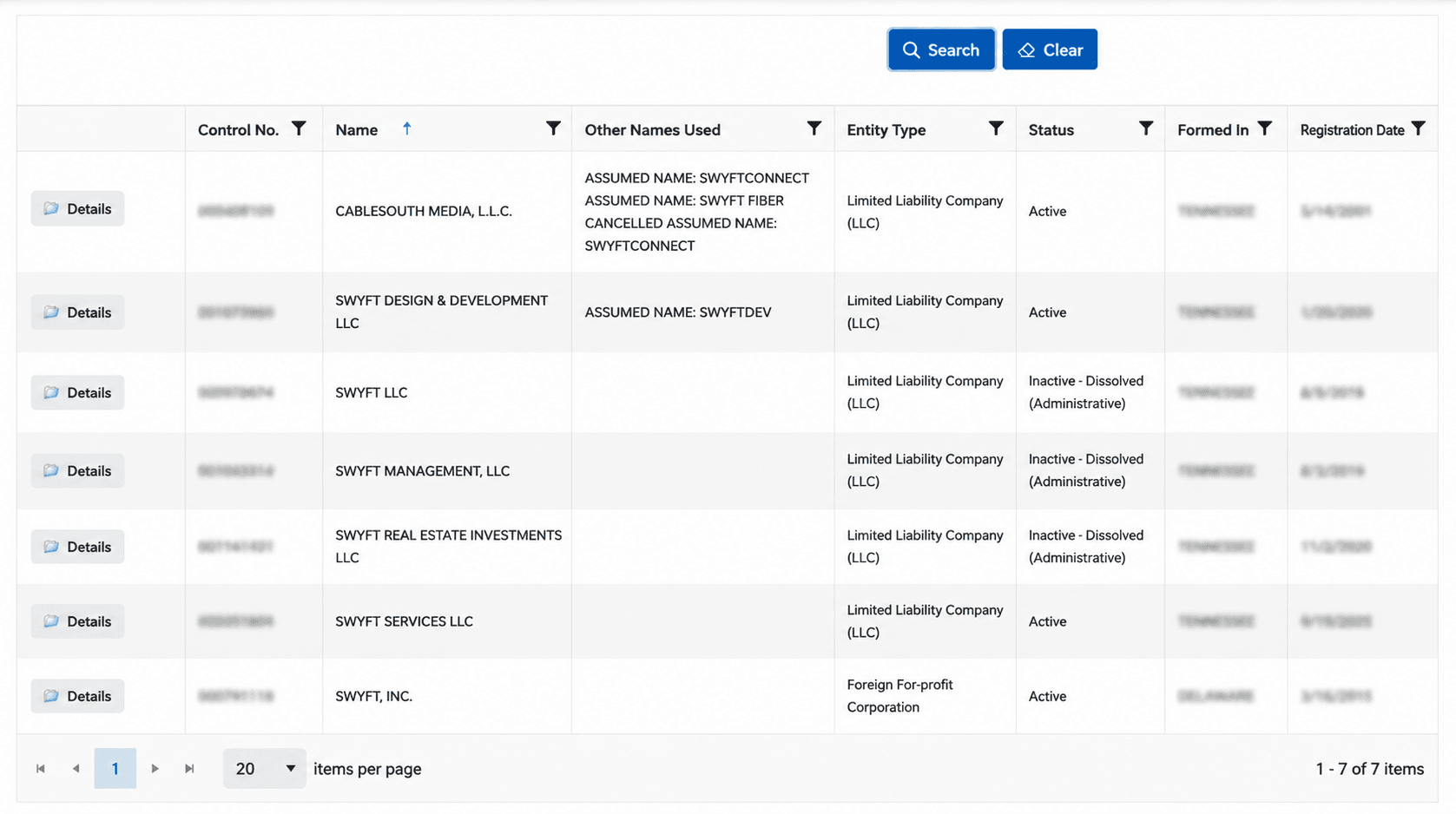
The results list is only a summary. The detailed view underneath it is where the useful information actually lives.
How To Read Your Tennessee Entity Search Results
Field | What It Tells You | Why It Matters |
Entity name | The exact registered legal name | It should match the name on any contract or invoice |
Control number | Tennessee's unique identifier for the entity | Confirms you opened the right record. Save it with the date you checked |
Status | Whether the entity is active, inactive, or dissolved | The single most important field on the page |
Entity type | LLC, corporation, nonprofit, LP, or LLP | Sets which filings and naming rules apply |
Formation or registration date | When it was registered in Tennessee | Check it against the track record the business claims |
State of formation | Tennessee, or another state for a foreign entity | Tells you where the company was actually formed |
Principal office address | Where the business says it operates | A mail drop or out-of-state address is worth a question |
Registered agent | Who accepts legal service in Tennessee | A stale or resigned agent is a compliance signal |
Filing history | Amendments, annual reports, and dissolutions on record | Shows whether the entity is current before you rely on it |
What Tennessee Entity Statuses Mean
What You See | What It Means | What To Do |
Active | Registered and current on its required filings | Proceed with normal due diligence |
Inactive | The entity missed a requirement, most often an annual report | Ask when it will be cured, since reinstatement is usually possible |
Administratively Dissolved | The Secretary of State ended it for continued non-compliance | It cannot conduct normal business until reinstated |
Dissolved | The owners closed it voluntarily | Do not contract with it |
Withdrawn | A foreign entity ended its Tennessee registration | Confirm where it is currently registered instead |
Why a Tennessee Status Changes
Tennessee entities file an annual report by the first day of the fourth month after their fiscal year closes, which is April 1 for a calendar-year filer. Missing the deadline moves an entity from active to inactive, and continued non-compliance leads to administrative dissolution.
Because the deadline tracks each entity's fiscal year rather than a single fixed date for everyone, two companies formed in the same week can have different annual report deadlines. Swyft Filings can handle your Tennessee annual report so the date and the fee are not yours to track.
Tennessee Business Search vs. Other Verification Tools
Tennessee Secretary of State Business Search vs. USPTO Trademark Search
These two tools protect different things, and clearing one says nothing about the other. The Tennessee search only checks a name against other state filings. It has no visibility into federal trademarks. A name can be perfectly distinguishable in Tennessee and still infringe a mark that a company in another state registered with the USPTO years ago. If the brand matters beyond your own county, search the USPTO trademark database separately before you commit to a name.
Tennessee Secretary of State Business Search vs. Google Maps Business Verification
A Google Business Profile confirms that a listing exists and looks active to customers. It says nothing about whether the business is legally registered, up to date on its filings, or even the entity type it claims to be. The state search is the legal record. Google Maps is a marketing listing. Use the state search to confirm a company is real and compliant, and use Google Maps separately to judge how it presents itself to customers.
Why Your Chosen Business Name May Show as Unavailable in Tennessee
Tennessee requires a new name to be distinguishable from every name already on file, whether that name is a true entity name, an assumed name, or a current reservation. Distinguishable means genuinely different, not just formatted differently.
Tennessee ignores capitalization, punctuation, spacing, and the entity designator when it compares two names. Changing "LLC" to "L.L.C.," adding a hyphen, or capitalizing a different word will not clear a name that already conflicts. What usually creates distinguishability is a genuinely different word, a different core keyword, or a meaningful change, such as a singular name becoming plural.
If a name is genuinely close to one already on file, Tennessee has a formal way through it: the holder of the existing name can file a written consent for use of an indistinguishable name, which allows the new filing to proceed despite the similarity. This is worth knowing if the conflicting name belongs to a related company, a prior business of yours, or someone willing to grant permission.
How To Check if a Business Name Is Available in Tennessee
- Search the full proposed name in the Business Entity Search first, exactly as you intend to file it.
- Search again using only the single most distinctive word, dropping the entity designator.
- Search once more without any punctuation, since Tennessee ignores it.
- Uncheck Active Entities Only to catch inactive and dissolved conflicts.
- Open any close match and read its full record before deciding it is a real conflict.
- Search the federal trademark register separately, since Tennessee's search does not cover it.
A clear result across every one of these searches is preliminary. Tennessee makes the final decision only when it processes and accepts your formation document.
Still deciding what to call the business? The free Swyft Filings business name generator is a sensible first stop before you pay a reservation fee.
Tennessee Business Naming Rules and Restricted Words
Entity Type | The Name Must Contain |
Limited liability company | "Limited Liability Company," LLC, or L.L.C. |
Corporation | "Corporation," "Incorporated," "Company," or Corp., Inc., or Co. |
Professional corporation | Professional corporation,” “professional association,” or “service corporation,” or P.C., P.A., or S.C. |
Limited partnership | "Limited Partnership" or LP |
Limited liability partnership | "Registered Limited Liability Partnership" or LLP |
Words That Need Approval or Are Restricted
- Financial and professional terms: A name cannot suggest affiliation with a federal or state agency, such as Treasury or Homeland Security, without written certification.
- Government-implying wording: A name cannot suggest affiliation with a federal or state agency, such as Treasury or Homeland Security, without written certification of that affiliation.
- Nonprofit wording: A name suggesting charitable status needs documentation matching the entity type actually filed.
- Olympic-related terms: Words tied to the International Olympic Committee are restricted under federal law, separate from any state rule.
A clear search is not the same as approval. Availability is only settled once Tennessee processes and accepts the filing itself.
How To Reserve a Business Name in Tennessee After Checking Availability
Detail | Information |
Filing | Application for Name Reservation, Form SS-9425, filed with the Secretary of State [4] |
Fee | $20 |
Term | Four months (120 days) from the date it is filed |
What it does | Holds the name so no one else can file it while you prepare your formation documents |
- Confirm the name is clear in the Business Entity Search first.
- Complete the Application for Name Reservation.
- Submit it with the $20 filing fee.
- File your formation document within the four-month hold if you want to lock the name in permanently.
A reservation does not register the name. It only prevents someone else from filing it first. If your formation paperwork is already ready, you can skip the reservation and file directly, which claims the name at the same moment.
How To Register a DBA or Assumed Name in Tennessee
Your Business | Where the Assumed Name Filing Goes |
LLC or corporation | Application for Registration of Assumed Name, filed with the Secretary of State. $20, valid for five years |
Sole proprietor | County clerk or county register of deeds where the business operates. The exact office varies by county |
General partnership using its own name | No separate name registration is required |
A Tennessee assumed name registered with the state runs for five years from the filing date and must be renewed within the two months before it expires, for another $20. Nothing prompts you automatically, so it is worth tracking the expiration date yourself.
For example, a registered Tennessee LLC that wants to trade under a different brand files its assumed name with the Secretary of State, and that assumed name then appears in the Business Entity Search tied to the LLC's control number. A sole proprietor doing the same thing files locally instead, and that filing never reaches the state database at all.
Swyft Filings can handle your Tennessee DBA registration at whichever level applies to your business.
What Happens If You Use an Unregistered Business Name in Tennessee
- No documented claim to the name: Nothing stops another business from filing that exact name with the Secretary of State while you keep using it unregistered.
- Someone else can claim it first: Nothing stops another business from filing that exact name with the Secretary of State while you keep using it unregistered.
- Banking and contract friction: Banks, landlords, and vendors often ask for proof of an assumed name filing before they will do business under a name that differs from your legal name.
- It never protects a brand nationally: A state or county filing does not grant trademark rights, so it can’t stop a similar name from being used elsewhere in any case.
If you are already trading under a name and have not filed it, registering it now is usually a short process and closes most of this exposure.
Tennessee Business Name Search for Out-of-State Entities Expanding to Tennessee
- Run the Business Entity Search on your existing legal name before you file anything.
- If the name is taken in Tennessee, you will need to register under an alternate name for use in the state.
- Request a Certificate of Existence, or Certificate of Good Standing, from your home state.
- File an Application for Certificate of Authority with the Secretary of State, along with the Certificate of Existence: $300 for a foreign LLC, or $600 for a foreign corporation.
- Appoint a Tennessee registered agent with a physical street address. A post office box is not accepted.
Swyft Filings can handle your Tennessee foreign qualification, so the paperwork and the deadline are not yours to manage.
Tennessee Business Name Search Checklist for First-Time Entrepreneurs
- Write down two or three name candidates before you search anything.
- Run each candidate through the Business Entity Search.
- Drop the entity designator and search the distinctive word alone to widen the net.
- Uncheck Active Entities Only for older conflicts.
- Check the domain name and the social handles you actually intend to use.
- Search the USPTO trademark database separately if the brand matters beyond Tennessee.
- Reserve the winning name for $20 if you are not ready to file immediately.
- File your formation document, or your assumed name registration, before the reservation expires.
How To Verify a Tennessee Company Before You Deal With It
- Search the exact legal name printed on the contract or invoice, not the brand name on the sign.
- Confirm the status reads Active rather than Inactive or Administratively Dissolved.
- Save the control number, the status, and the date you checked.
- Check the formation date against the years of experience the business claims.
- Read the registered agent and confirm the address is a real Tennessee street address.
- Open the filing history and look for recent amendments, dissolutions, or reinstatements.
- Order a Certificate of Existence from the Secretary of State if the deal is significant.
Red Flags Worth a Second Look
- A company using LLC or Inc. in its name with no Tennessee record at all.
- An Inactive or Administratively Dissolved status behind a business presenting itself as fully compliant.
- No annual report filed in well over a year.
- A brand name that does not appear as a registered assumed name of the entity you found.
- A registered agent address that is only a mail drop, or an agent who has resigned.
Let Us File Your Tennessee Business
Swyft Filings has helped over 600,000 businesses get started since 2015. We handle Tennessee LLC formation, C Corp and nonprofit filings, registered agent service, DBA registration, annual report filing, and foreign qualification, so no deadline is yours to track.
Bibliography
Tennessee Secretary of State. Business Entity Search, TNCaB Charity and Business Filing System. Accessed August 13, 2026.
Tennessee Secretary of State. Business Forms & Fees. Accessed August 13, 2026.
Tennessee Secretary of State. Business Services. Accessed August 13, 2026.
Tennessee Secretary of State. Application for Name Reservation, Form SS-9425. Accessed August 13, 2026.
FAQs
You can perform a Tennessee Secretary of State business search through the Business Entity Search on TNCaB. Search by business name or control number. The search is free and does not require an account.[1]
The Tennessee business entity search is the Secretary of State's public database containing records for LLCs, corporations, partnerships, and registered assumed names filed in the state. The current system combines business search and name availability functions.[1]
You can search the Tennessee business database through the Business Entity Search by entering a business name or control number. To view inactive companies as well, remove the Active Entities Only filter.[1]
Yes. Tennessee's Business Entity Search is free and allows users to look up business records without creating an account or logging in.[1]
To search a Tennessee business name, start with the exact name, then search using the most distinctive word without punctuation. Using multiple search methods helps identify possible conflicts before registration.
The TN SOS business entity search refers to the Tennessee Secretary of State's Business Entity Search system operated through TNCaB. TN SOS is a common abbreviation for the Tennessee Secretary of State.[1]
A Tennessee business name reservation costs $20 and holds the name for four months. Reserving a name is optional, so businesses can choose to file formation documents directly if they are ready.
An LLC or corporation can register a DBA, also called an assumed name, by filing an Application for Registration of Assumed Name with the Secretary of State for $20. The registration is valid for five years. Sole proprietors generally file assumed names with the county clerk or register of deeds.
Yes. Tennessee business searches can show dissolved, withdrawn, and other inactive entities when the Active Entities Only filter is disabled. These records remain available with their status and filing history displayed.[1]