Learn how to run a free South Dakota Secretary of State business search, read every field in the results table, and understand when the state legally requires you to file a DBA.
South Dakota has no corporate income tax and some of the most permissive trust and asset-protection laws in the country. That combination pulls in a lot of out-of-state holding companies, which means the register contains plenty of entities whose real activity is somewhere else entirely. Let's learn how to check a South Dakota company properly.
What Is the South Dakota Business Entity Search?
It is the free public FilingSearch tool run by the Secretary of State's Business Services division, and it covers every entity registered in the state. [2]
Detail | What to know |
Official tool | FilingSearch, at sosenterprise.sd.gov |
Operated by | SD Secretary of State, Business Services |
Cost to search | Free, 24/7, no account |
Search by | Business name, or Secretary of State Business ID |
Match filters | "Starts with" or "contains," plus an active-only checkbox |
Results columns | Business ID, Type, Name, Name Type, Filing Date, Status |
Bulk data | The full database can be downloaded for a fee |
How Do You Perform a South Dakota Business Entity Search?
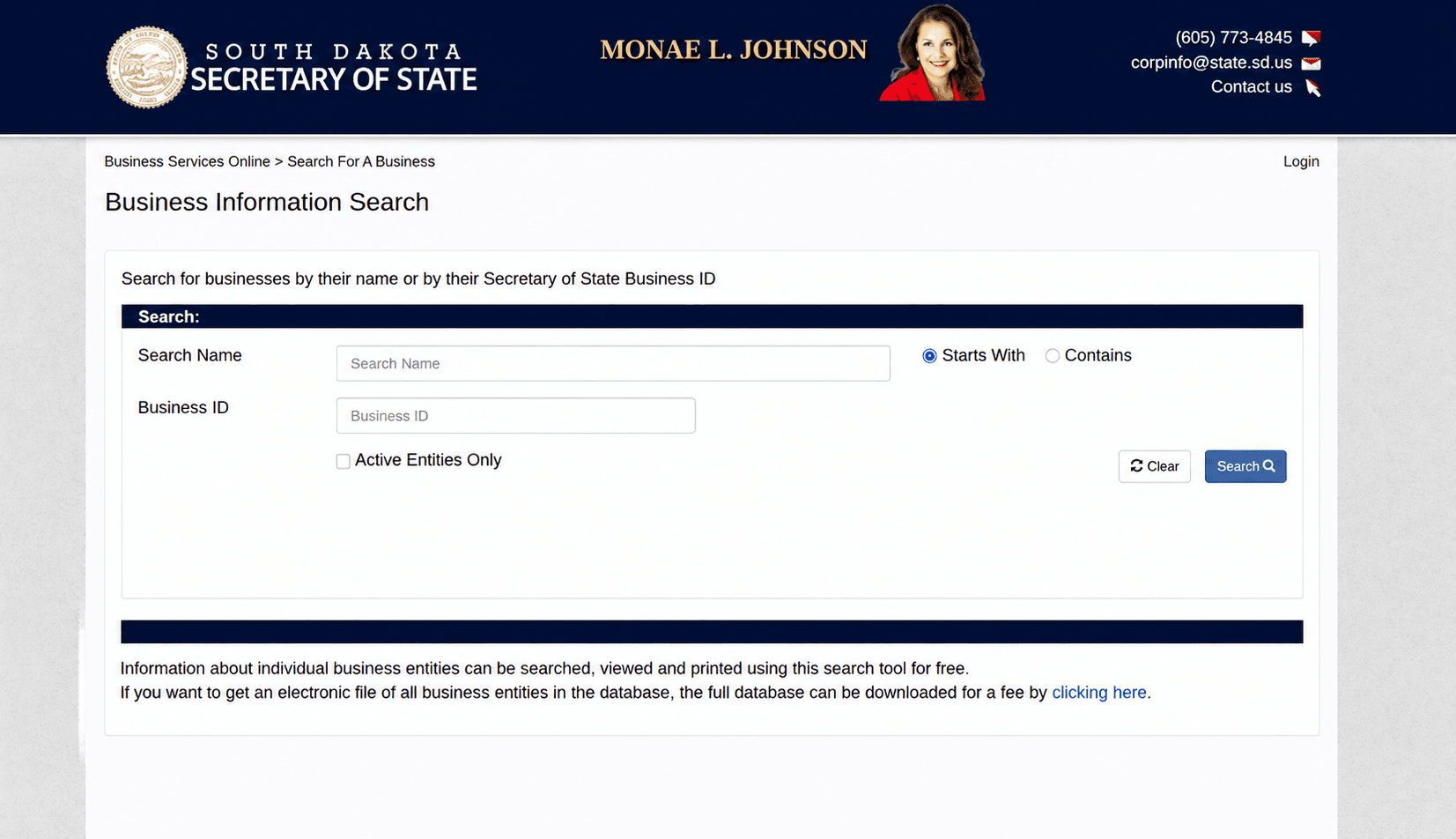
Open FilingSearch, type the name, set the two filters, and click the Business ID in the results. The whole thing is free and takes under a minute.
- Go to the FilingSearch page. [1]
- Enter the business name, or the Secretary of State Business ID if you have it.
- Choose "starts with" or "contains" using the radio filters.
- Decide whether to tick active entities only.
- Read the results table.
- Click the Business ID to open the full record and filing history.
Which Match Filter Should You Use?
Contains, almost always. "Starts with" only finds names that open with your exact text, so searching "Dakota" will miss "Black Hills Dakota Supply LLC" entirely.
Filter | What it returns | Use it when |
Starts with | Names beginning with your text | You know exactly how the name opens |
Contains | Names with your text anywhere inside | Clearing a name, or working from a partial name |
Drop the designator too. Searching "Black Hills Gems" returns more than "Black Hills Gems LLC" will.
Should You Tick the Active-Only Box?
It depends entirely on why you are searching, and getting it wrong is the most common mistake on this tool.
- Vetting a company you already know exists → tick it. You want the current record.
- Clearing a name for a new business → leave it unticked. Dissolved, withdrawn, revoked, and cancelled entities all appear when you do, and you need to see them.
Left unticked, the results table shows active and dissolved, withdrawn, revoked, and cancelled entities together. [1]
What Do the Columns in Your Search Results Mean?
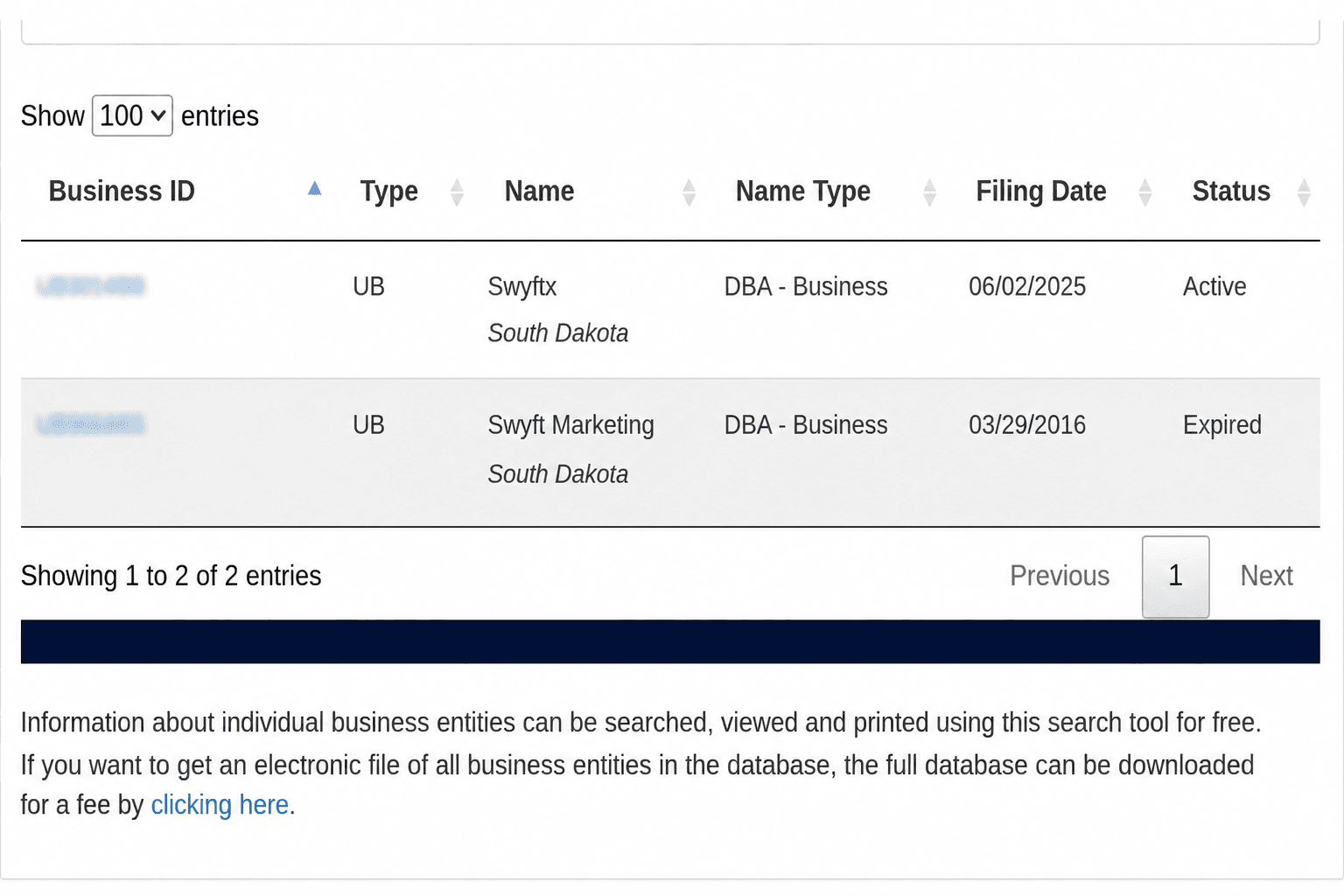
The results table returns six columns, and two of them are frequently misread.
Column | What it tells you | Why it matters |
Business ID | South Dakota's unique identifier | Click it to open the record. Save it for repeat lookups |
Type | LLC, corporation, nonprofit, LP, LLP | Sets which rules and filings apply |
Name | The registered name | Check it against the name on any contract |
Name Type | Whether this is a legal name or a DBA | The column people skip. A hit may be a fictitious name, not a company |
Filing Date | When it was filed with the SOS | Check it against the experience being claimed |
Status | Active, dissolved, withdrawn, revoked, cancelled | Read it before anything else |
South Dakota returns fictitious business names alongside entities in the same table. A result that looks like a competitor may be a DBA registered by someone else entirely, or by a company you have already found under its legal name.
What Does the Full Entity Record Show?
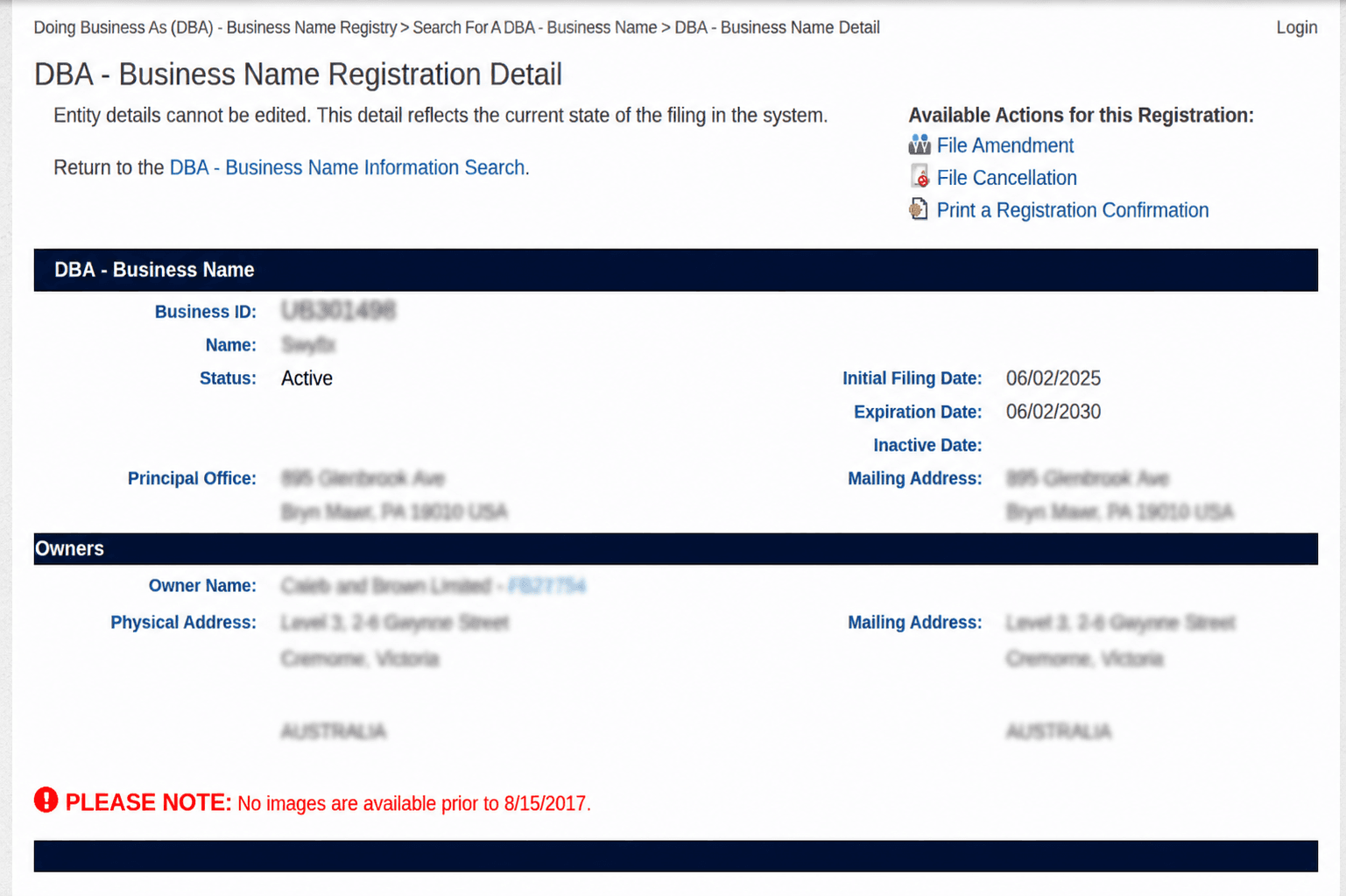
Click the Business ID, and you get the complete profile: entity type, status, formation date, registered agent, addresses, and the filing history.
South Dakota displays a detailed history of every annual report the entity has filed. That history is the most useful part of the record for due diligence, because it shows you continuity rather than a single-moment snapshot.
Can You Search South Dakota Businesses by Registered Agent or Officer?
No. FilingSearch takes a business name or a Business ID, and nothing else. [1]
There is no reverse lookup by agent, officer, or organiser. If you need to know which other entities a person or agent is connected to, you cannot get there from this tool.
What to do instead: find the entity by name, open the record to read its agent, and contact Business Services if you need to go further. For volume work, the Secretary of State makes the full database available for download for a fee, noted on the search page itself, which is the sanctioned route for anything a single lookup will not answer. [1]
That download option is unusual, and it is worth knowing about before you resort to scraping a tool that was not built for it.
What Do South Dakota Entity Statuses Mean?
Status | What it means | Can it operate? |
Active / Good Standing | Registered and current with the state | Yes |
Dissolved | The entity has ended, voluntarily or by state action | No |
Withdrawn | A foreign entity ended its South Dakota registration | No, not in SD |
Revoked | The state withdrew its authority | No |
Cancelled | The registration was terminated | No |
Can a Dissolved South Dakota Entity Come Back?
A domestic one usually can. A foreign one cannot. This is a genuine South Dakota distinction, and it catches people out. The Secretary of State states that foreign business entities cannot be reinstated; they must file for an entirely new Certificate of Authority. [3]
So if you find an out-of-state company with a revoked or withdrawn South Dakota registration, it is not a matter of them curing a lapse. They have to start their South Dakota registration again from scratch.
How Do You Check If a Business Name Is Available in South Dakota?
Run the search with contains selected and the active-only box unticked, then check anything close.
- Search your full proposed name.
- Search for the single most distinctive word in it.
- Search again without the designator and without punctuation.
- Read the Name Type column so you know which hits are DBAs.
- Check the status of any close match.
- Search the federal trademark register, which South Dakota does not check.
A no-match result is preliminary. The Secretary of State decides when it reviews your filing.
Still deciding what to call the business? The free Swyft Filings business name generator is a sensible first stop.
What Are South Dakota's Business Naming Rules?
Your name must be distinguishable from every name already on record and carry the right designator for your entity type. [4]
Entity Type | The name must contain |
Limited liability company | LLC, L.L.C., LC, or L.C. |
Limited partnership | LP or L.P. |
Limited liability partnership | LLP or L.L.P. |
Corporation | Corporation, Incorporated, Corp., Inc., or Limited |
What Names Does South Dakota Reject
- Names indicating government affiliation. Nothing implying you are a government agency.
- Restricted terms. Bank, insurance, engineering, and similar words need the matching licence.
- Names that are too close to an existing name. Similar names may be permitted if enough is added to genuinely distinguish them.
What Are the Rules for Sole Proprietors and Partnerships
A sole proprietorship or general partnership name must include the actual surname of each owner, unless a fictitious name is registered. These businesses do not append LLC or Inc., because they are not one.
That rule is what drives South Dakota's DBA requirement, covered next.
Do You Have to File a DBA in South Dakota?
Yes, in most cases. South Dakota law generally requires a person regularly engaging in or conducting business in the state to file a fictitious name statement when doing business under a name that does not meet one of two statutory exceptions under SDCL § 37-11-1. [3] You do not need to file a fictitious name statement if:
The business name plainly shows the true surname of each person interested in the business, or the business name is already on file with the South Dakota Secretary of State in a required business filing.
For example, if John Johnson operates a business under the name "Dakota Artisan Jewelry," that name does not show his surname. Unless another statutory exception applies, he generally must file a fictitious name statement before conducting business under that name.
South Dakota commonly refers to a DBA as a fictitious name or business name.
Where Do you file a DBA in South Dakota?
South Dakota allows a fictitious name statement to be filed electronically with the Secretary of State or in paper form with any Register of Deeds in the state. The filing is then recorded in the Secretary of State's electronic filing system. You do not need to make separate filings with both offices to satisfy the statutory filing requirement. [3]
Detail | South Dakota DBA |
Fee | $10 per name |
Term | Five years from the date of filing |
Renewal | $10 per name |
Where | SD Secretary of State online or any county Register of Deeds on paper |
A fictitious name statement must be renewed every fifth year if you continue operating under the name. The filing fee is $10 for both an initial filing and a renewal.
DBAs and fictitious business names cannot be used to form, create, or register an LLC, a business corporation, a nonprofit corporation, or a partnership. Those entities must be properly registered as such with the Secretary of State to be valid. [3]
Swyft Filings can handle your South Dakota DBA registration, and if you actually want the liability protection, you want an LLC.
How Do You Reserve a South Dakota Business Name?
File a name reservation with the Secretary of State. $25, and it holds the name for 120 days. [5] The fee is the same for every entity type. Reserving is optional; if your formation documents are ready, filing them claims the name at the same moment.
The Secretary of State charges an additional $15 paper processing fee on filings submitted on paper that could have been filed online. [3]
That is not a late fee or a penalty for doing something wrong. It is a surcharge for choosing paper when the online route existed. File online.
When you are ready, you can form your South Dakota LLC, or file as a C Corp or nonprofit.
Should You Check Anything Beyond the State Register?
Yes, three things, and none of them are in FilingSearch.
- The domain. Check the exact match and a fallback or two before you commit.
- The social handles. Check the platforms you will actually use.
- The federal trademark register. A name can clear South Dakota entirely and still infringe a mark held by a company that never registered here.
Keep your shortlist until one name clears all four checks. For enforceable brand protection, you want federal trademark registration.
How Do You Use the Search for Due Diligence?
Confirm four things before you sign, lend, or partner: the legal name, the status, the agent, and the filing history.
- Search the exact legal name from the contract, not the brand name.
- Save the Business ID, the status, and the date you checked.
- Confirm the status is active, and remember that a foreign entity that lost its registration cannot simply reinstate.
- Check the Name Type column so you know whether you found the company or one of its DBAs.
- Read the filing date against the track record being claimed.
- Open the record and read the annual report history rather than the summary.
- Confirm the registered agent details are current.
Red flags Worth a Second Look
- A company using LLC or Inc. with no record at all, or a record whose Name Type is a fictitious name, which means they may not have the entity they claim.
- Any status other than active behind a business presenting itself as fully operational.
- A foreign entity with a withdrawn or revoked registration, which cannot be quietly cured.
- Gaps in the annual report history.
- A filing date far more recent than the experience being claimed.
Let Us File Your South Dakota Business
Once your search confirms a name is clear across the register, the counties, and the federal trademark database, filing is the step that follows. Swyft Filings has helped more than 600,000 businesses get started since 2015. We handle South Dakota LLC formation, C Corp and nonprofit filings, registered agent service, DBA registration, annual report filing, and business name changes.
Bibliography
- South Dakota Secretary of State. Business Information Search (FilingSearch). Accessed on August 7, 2026.
- South Dakota Secretary of State. Business Services. Accessed on August 7, 2026.
- South Dakota Secretary of State. Corporations FAQs and Contact. Accessed on August 7, 2026.
- South Dakota Legislature. SDCL 47-34A-105, Limited Liability Company Name. Accessed on August 7, 2026.
- South Dakota Secretary of State. Business Forms and Fees. Accessed on August 7, 2026.
- South Dakota Department of Revenue. South Dakota Department of Revenue. Accessed on August 7, 2026.
Other Important Resources
FAQs
Yes. South Dakota FilingSearch is free, available 24/7, and does not require an account or login. Fees only apply for filings, certificates, and bulk database downloads.[1]
Yes. South Dakota FilingSearch allows searches by business name or Secretary of State Business ID. Searching by Business ID returns one exact record and can be used to directly access a company's filing information.[1]
No. South Dakota FilingSearch only provides searches by business name and Business ID. It does not offer reverse searches by registered agent, officer, or organizer. Additional research may require the Secretary of State's database download option.[1]
Usually yes. South Dakota requires businesses operating under a name other than the legal name to file a fictitious name statement, unless an exception applies under state law.[3]
No. A South Dakota DBA or fictitious name does not create an LLC or corporation. Adding terms such as LLC or Inc. to a DBA does not provide entity status or liability protection. A DBA only registers a business name.[3]
You can file a South Dakota DBA with either the Secretary of State or a county Register of Deeds. You do not need to file with both. The filing costs $10, lasts five years, and can be renewed for $10.[3]
A South Dakota business name reservation costs $25 and holds the name for 120 days. The reservation is optional if you are ready to submit your formation filing.
The additional $15 fee applies to certain paper filings that could have been submitted online. Filing electronically avoids this extra processing fee.[3]
No. An EIN is a federal tax identification number issued by the IRS and is not available through South Dakota business records. The South Dakota Business ID is a separate state identifier used for entity records.
No. South Dakota does not have one general statewide business license for all companies. Businesses may need a sales tax license or industry-specific licenses depending on their activities. A FilingSearch record only confirms entity registration, not licensing compliance.[6]
Yes. South Dakota FilingSearch can show dissolved, withdrawn, revoked, and cancelled entities when the active-only filter is removed. These records remain visible with their status displayed.[1]